

SUPPORT FAQS
How do I play Daily Ole?
Each day, a new fixture is released with a mystery player's rounded stats: appearances, goals, honours.
Study the stats, use your clues, and guess correctly before full time.
Match timeline (KO → FT) tracks progress across up to 10 guesses.
Clues unlock progressively:
• Attempt 3: Era (e.g. 1992–2002)
• Attempt 4: Nationality flag + FIFA code
• Attempt 5 (HT): Position + 5 optional Super-Sub clues
Super-Sub clues include career facts, transfer fees, clubs, shirt numbers, caps, disciplinary records.
Each sub used penalises GD by 1+.
Autocomplete at 2+ characters. Duplicate guesses block without consuming an attempt.
Skip to HT (best: Draw) or FT (Loss) with confirmation.
How does scoring work?
Your result is scored like a real football match:
• Win (guessed in 1-3 attempts): 3 points
• Draw (guessed in 4-9 attempts): 1 point
• Loss (used all 10 attempts): 0 points
Your goal difference is also affected, the fewer attempts and sub-clues you use, the better your GD.
What are levels?
Levels are groups into fixtures types (e.g. Home Fixtures, Away Fixtures). Complete fixtures within a level to unlock the next one. Each level tracks your points, games played, and goal difference.
How do leaderboards work?
Leaderboards are powered by Apple's CloudKit and synced via your iCloud account. Your team name and scores are shared — no personal information like your real name or email is used.
What is the international edition?
The international edition is an optional in-app purchase that unlocks a separate set of daily fixtures based on iconic World Cup players performance stats, with its own leaderboard.
How do I restore my purchase?
Go to the settings tap "Restore Purchase". This will restore any previous purchases linked to your Apple ID.
Can I change my team name or kit colours?
Yes — you can update your team name and kit theme from Settings at any time.
How do notifications work?
Notifications are scheduled locally on your device to remind you when a new fixture is available. No data is sent to any external service. You can turn them off in Settings.
How do I reset my progress?
- Leave a league via in-app button: removes user's entry from that leaderboard
- Delete the app: removes all local data from the device
- Email us: info@ole-ole-ole.com with team name + league code, permanent deletion of CloudKit data (leaderboards, fixture progress, reports), actioned within 30 days
- No traditional user account exists (no sign-in, no email collected)
How do I contact support?
Email us at info@ole-ole-ole.com or use the Help & Support form below.
A. TIMELINE
Answer correctly before FT to win.
C. FACTS
Date range of when the player was active. Country represented at national level. Position best known for playing.
D. SUPER-SUBS
At half-time you unlock your substitute clues.
F. GUESSES
See your previous guesses. Stuck? Jump to HT for more clues, or skip to FT.
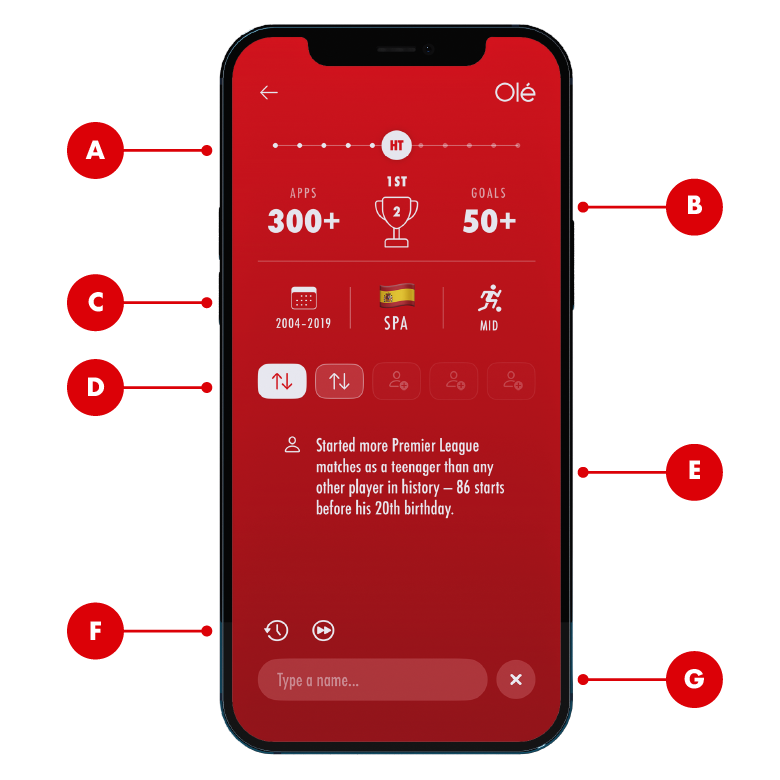
B. PLAYER DATA
Appearances (APPS) and goals (GL) figures. Trophy icon displays the number of Premier League titles won. Table icon represents their highest placed finish.
E. CLUES
Additional facts that reveal more information unlocked from the Super-subs clues (D).
G. SEARCH
Start typing to see auto-suggested players.